Site Audit
Site audit that crawls your pages and tells you what to fix first
Crawl your site, test every page against 33 technical checks, and get a to-do list ordered by severity. Add Lighthouse for performance, accessibility and best-practice findings.
Rewrite the titles the audit flags
A free RoamSEO tool. No account needed.
Crawl, sort, fix
- 01
Start a crawl
Give it a URL and a page limit. The crawler respects robots.txt, stays on your domain and records status codes, titles, descriptions, headings, canonicals, links, alt text and load time for each page.
- 02
Fix in order of severity
Critical problems such as blocked pages, server errors, broken internal links and missing titles sit at the top. Warnings and info come after, so you always know the next job.
- 03
See exactly which URLs
Click an issue to list every affected URL with the offending title or description. Export the list for your developer or writer.
What an audit covers
- Crawled URLs
- Coverage
- Issue severity
- Priority
- Affected pages
- Scope
- Audit history
- Progress
Good times to run one
- Check a new store or site before you spend on content.
- Catch what broke after a redesign, migration or theme change.
- Give a developer a list of URLs, not a vague health score.
Why audit here
- Audits live in the same project as your keywords, rankings and backlinks.
- Your AI agent can start an audit over MCP and walk you through the results.
- Each issue says what was checked and how to fix it.
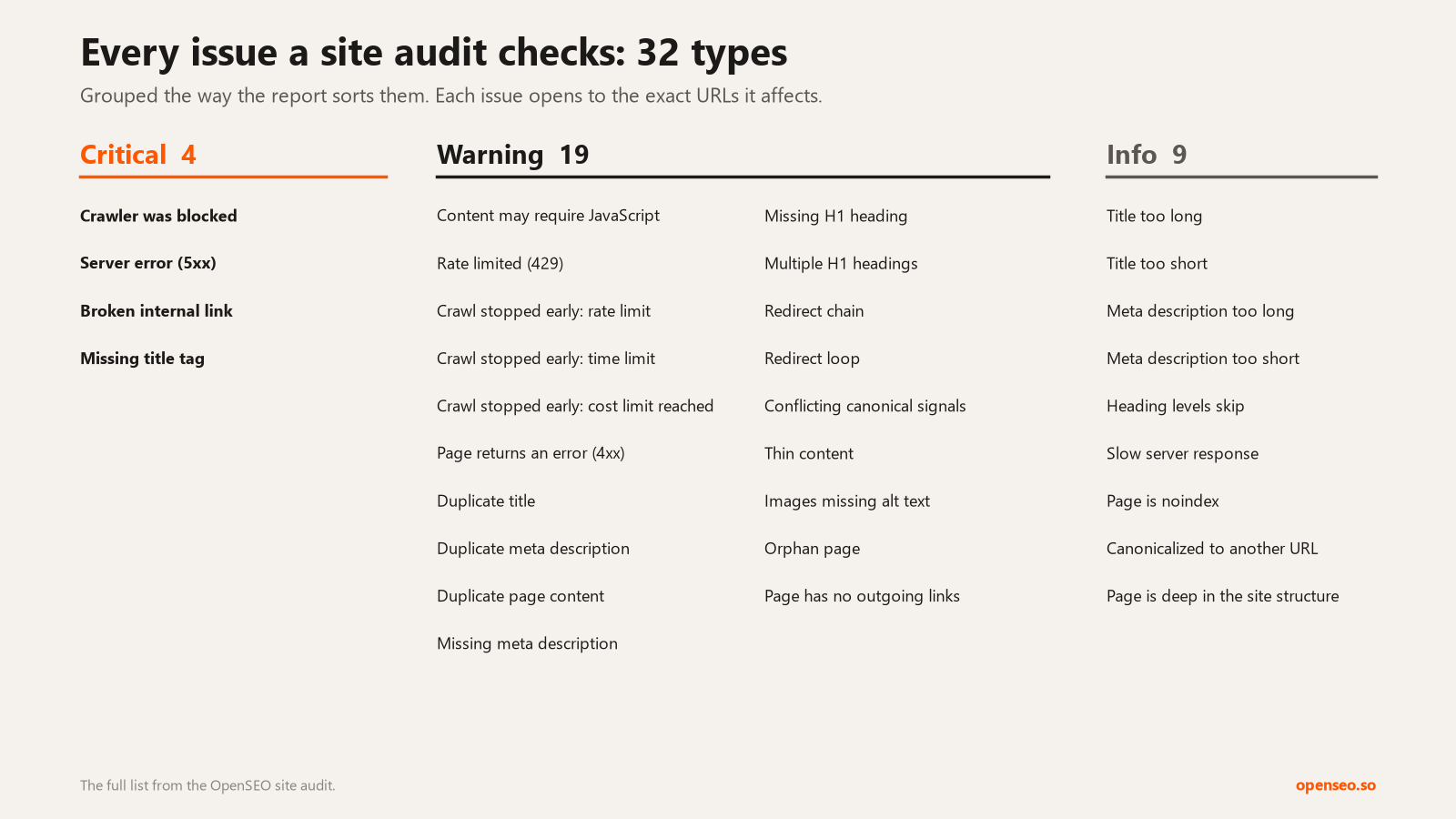
33 checks, each with a severity
Four checks are critical: the crawler was blocked, the server returned an error, an internal link is broken, or a page has no title. Twenty are warnings, such as duplicate titles or content, redirect chains and loops, conflicting canonicals, thin pages and orphan pages. Four of those warnings flag a crawl that stopped early, so a cut-short audit never looks like a clean one. The remaining nine are info, like title length or pages buried many clicks deep.
Works on JavaScript-heavy sites
Many modern sites send almost empty HTML and build the page in the browser. Turn on rendering and RoamSEO opens each page in a real browser before checking it, within your plan's page limit. If a page returns a bot challenge, it retries with a second renderer. Rendering uses credits per rendered page and stops after 22 hours. If a site rate-limits the crawler, the audit slows down and retries instead of marking pages as blocked.
Let your AI agent run it
Connect RoamSEO to Claude, Cursor or ChatGPT over MCP. The agent can launch an audit, watch its progress and read the issues by severity. Ask it which critical issues matter most, or to rewrite every title that is too long, and it works from the same report you see in the app.
Site audit guides
Strategies for turning a crawl into planned work, each with a walkthrough and a prompt for your agent.
The technical SEO audit checklist that ends in fixes
Cut 1,180 findings down to the 35 that stop pages being found.
Write an audit report the client will actually act on
Six sections linking each finding to a page, a cost and an owner.
Index bloat: when the fix is deleting pages
Confirm what Google has indexed before you remove anything.
Pair the audit with
Site audit FAQ
What does the site audit check?
33 issue types on every crawled page: status codes, titles, meta descriptions, headings, canonicals, redirects, internal links, image alt text and response time. With Lighthouse on, a sample of pages also gets performance, SEO, accessibility and best-practice scores.
Can I audit a site for free?
Yes, small sites. A free account can crawl up to 50 pages per audit. Paid plans, from $10/month, crawl up to 10,000 pages per audit.
What is the page limit per audit?
50 pages on a free account, 10,000 on a paid plan. Rendered audits use the same limits and end after 22 hours.
Does it handle JavaScript sites?
Yes. With rendering on, each page loads in a browser before it is checked. Rendering costs more credits than a plain crawl.
Who is the site audit for?
Store owners, marketers, agencies and developers who want one crawl report they can work through together and export.
Try RoamSEO
A low-cost alternative to bloated, expensive, legacy SEO tools.